We use cookies to make your experience better. To comply with the new e-Privacy directive, we need to ask for your consent to set the cookies. Learn more.

In stock
Product Code
Mxp-541A-002
SKU
AD1000
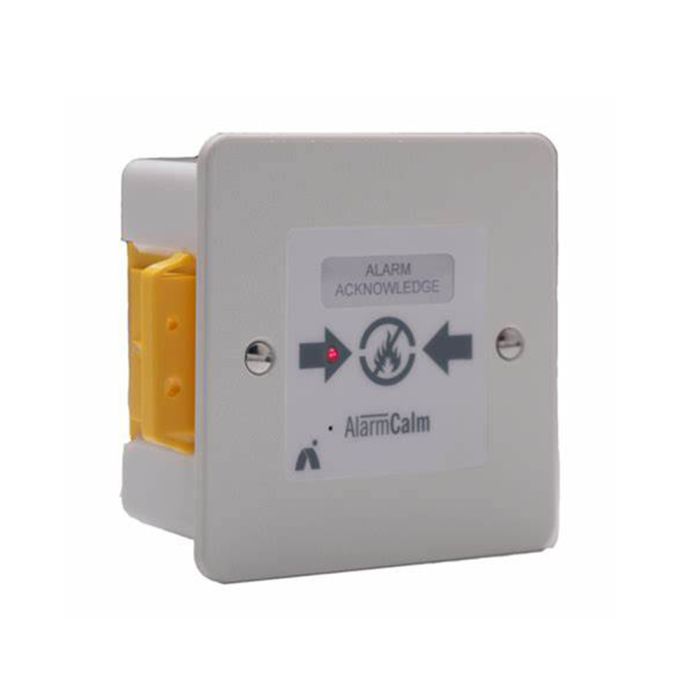
Advanced AlarmCalm Button - Apollo
Intelligent Alarm Acknowledgement Button Apollo Protocol
DELIVERY
We always aim to same day dispatch on all orders received before 2.30pm.
TRADE COUNTER
Firesense also offer the ability to collect your order from our trade counter.
AlarmCalm
Complete false alarm management
Overview
AlarmCalm is a powerful, flexible false fire alarm management solution that’s simple to install and easy to configure. It reduces unwanted alarm disruption in a wide range of building types including apartment blocks, supermarket bakeries, manufacturing plants, hospitals and apartments. It’s available on MxPro 5, Go, AxisGo and Axis EN panels.
How AlarmCalm Works
AlarmCalm is fast, easy to use and simple to configure. It can scale from small installations to large sites with complicated cause and effect.
Using alarm verification and investigation delay technology, AlarmCalm allows additional time to respond, verify or investigate an alarm before the fire system goes into full alarm state.
Intuitive software allows you to program effective false alarm management strategies thanks to the use of virtual ‘building areas’.
Building areas are independent of detection zones and are assigned to parts of a building to enable the precise programming of alarm verification and investigation delays to outputs.
An optional, intelligent alarm acknowledgement loop device – the AlarmCalm button – is also available for use in settings where building occupants are able to play a part in false alarm identification.
How AlarmCalm Will Help You
Easy configuration
- It’s easy to configure AlarmCalm using the programming tab in our Config software
- Settings are managed via simple yes/no matrices and you can achieve complicated configurations in just a few clicks.
Alarm verification and investigation delay
- False alarm management (FAM), is built around configurable time periods that occur either side of a latched fire condition
- The time period before a latched fire condition is specified as alarm verification and the period after is investigation delay
- They both offer significant but different FAM options and are managed in the same way through software which has been designed with ease of use and speed of configuration in mind.
Day and night settings
- Using the programmable time clocks available within our config software, different false alarm strategies can be programmed according to time of day or day of week
- Different verification settings can be applied during the day or night and investigation delays can be programmed to be in use at different times on different days
- Each time clock works on a seven-day week, allowing different verification or investigation delay strategies to be activated during weekdays, weekends, during the day or at night
- AlarmCalm allows devices that support multiple sensitivity modes to verify an alarm using different settings based on the time and day. For example, combined optical/heat detectors could
- change to heat-only mode to verify the alarm at night.
Verification types
- Two kinds of verification methods are allowed on the Advanced fire network:
- Type A (not displayed)
- Allows any qualifying detector to go into alarm for up to 60 seconds without it causing a full fire alarm. The panel will not display the alarm during the verification period
- Type B (displayed)
- Delivers greater flexibility and allows full programming of outputs and visual warnings during the verification period. The alarm location is displayed at the panel and any associated remote terminals throughout the verification period.
Multiple verification options
- Verification strategy for each building area is highly flexible
- The following options are supported:
- Allow verification: yes/no
- Extend verification period/silence verification outputs using the optional AlarmCalm button
- Verified by second device within the same building area
- Verified by mode change. For example an optical/heat detector can confirm fire if it confirms a signal in both smoke and heat modes.
- Verification can be set quickly and simply according to device type in each building area. Heat, smoke, multi-sensors, call points or any input modules can be used as verification inputs. They
- can be set individually or by device type
- Verification can also occur simultaneously in multiple areas
- Users can set the maximum number of building areas in verification at any one time before a full fire condition is indicated
- Sounders, beacons and relays in each building area can be operated during the verification period. They can be quickly set by all devices of each type or individually by point.
Multiple verification timers
- With Type B (displayed) alarm verification, AlarmCalm delivers a number of adjustable timing parameters
- Verification time starts from the instant the smoke in a detector increases above alarm threshold or any other applicable input device is activated. The panel will turn on any programmed
- verification outputs for the building area during the verification time
- Verification hold time helps ensure that transient signals are displayed on the panel long enough to be acknowledged and investigated, but still trigger full alarm conditions when necessary. If the alarm signal clears before the verification time period has elapsed, the system returns to normal operation. This can be more or less than the verification time If the smoke or signal from a device remains above the alarm threshold when the verification time elapses, the panel will go immediately into full alarm condition.
False alarm management and networks
- Each panel is configured with its own verification strategy allowing each panel’s strategy to be changed without affecting the network
- By default all network nodes will be aware of verification alarms occurring at other nodes. The effects of this can be limited:
- Network display of verification can be suppressed
- Maximum areas in verification can be monitored network wide
- Global alarm acknowledgement from other panels can be included or excluded by sector.
Global acknowledgement
- Panel inputs (e.g. a button on the panel) can be configured to extend the verification period regardless of the Building Area in verification or output delay. Options include:
- Alarm verification only Verification alarm in any building area is acknowledged without any effect on verification outputs
- Alarm verification with silence Verification alarm in any building area is acknowledged and outputs are turned off
- Delaying outputs/verification Dual function acknowledges both investigation delay and verification alarms.
Investigation delays to outputs
- Output delays are managed by AlarmCalm in exactly the same way and with the same flexibility as verification delays
- Day/night settings can be applied as well as the option to set the maximum number of building areas to be investigated
- Delayed alarm inputs can be set quickly and by all devices of each type, or individually by point.
Sounder ringing style
- Sounders can be programmed to turn on using different ringing styles to distinguish each stage of the verification or investigation delay periods.
Full event log
- All verifications and delays are recorded in panel event logs.
AlarmCalm Button
The optional AlarmCalm button is a fully intelligent loop-powered device that allows building occupants to acknowledge a fire alarm signal if they believe a smoke detector has signalled an alarm unnecessarily e.g. because of cooking smoke or water vapour from a shower.
Pressing the button activates a pre-programmed, second-stage timer. This extends the verification period set in the building area, allowing any transient signal to clear.
The following failsafes are built in:
- You can only press the button once per event
- The delay period is programmable
- You set the number of devices in simultaneous operation before an automatic fire condition is latched.
Features of The AlarmCalm Button
- Easy to install and configure
- Simple push-button operation
- Customisable slide-in label
- Silence unnecessary verification outputs (sounders, strobes, modules)
- Clear operation status via LED – pulse or constant
- Programmable AlarmCalm button buzzer on activation
- Programmable sounder ring styles for each event/time period
- Day/night/day of week operation by time clocks
- Verification by second device or mode change
- Programmable maximum number of AlarmCalm buttons in operation before full fire condition is signalled
- All time periods user defined
- Wiring terminations suitable for all Advanced recommended loop cables.
| Category Type | Interface |
|---|---|
| Colour | Grey |
| Protocol | Apollo |
| System Type | Addressable |
| Clearance | No |
Write Your Own Review

Specifications
| Dimensions (HxWxD mm) |
86x86x23 |
| Connection Details |
Loop In, Out & Screen connections |
| Control Buttons |
Push-Button Input |
| User Indication |
LED output: Blink on poll. Pulse during Stage-1 and ON during Stage-2 (Acknowledged) |
| Buzzer |
75 dB @1m |
| Current Consumption (Quiescent) |
Apollo 1.0mA (AV: 0.6mA) |
| Current Consumption (Alarm) |
Apollo 1.5mA (AV: 4.5mA) |
| Current Consumption (Buzzer) |
Apollo 7.6mA (AV: 8.5mA) |