We use cookies to make your experience better. To comply with the new e-Privacy directive, we need to ask for your consent to set the cookies. Learn more.

In stock
Product Code
143600.12.BL1
SKU
143600.12.BL1
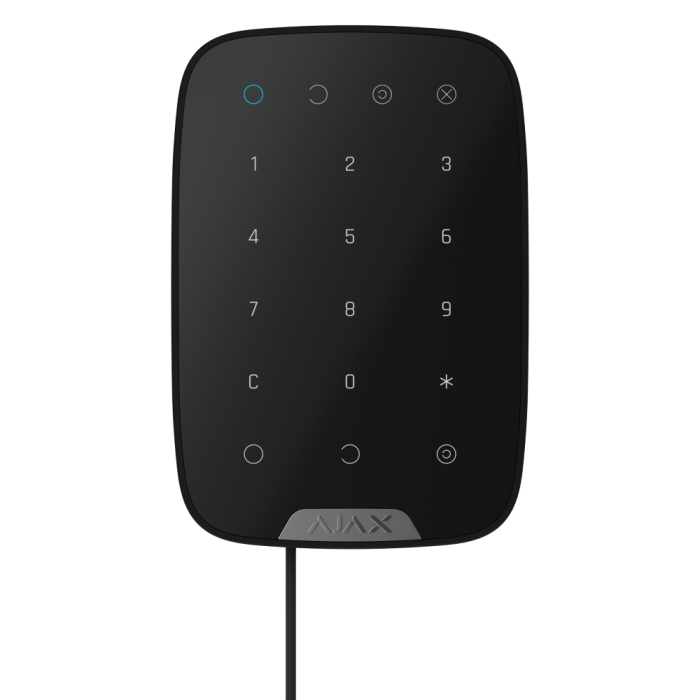
Ajax Superior Keypad Fibra ASP - Black
Wired keypad with touch buttons
DELIVERY
We always aim to same day dispatch on all orders received before 2.30pm.
TRADE COUNTER
Firesense also offer the ability to collect your order from our trade counter.
Superior KeyPad Fibra
Wired keypad with touch buttons
Control simplicity at its best
Superior KeyPad Fibra is a reliable, easy-to-use tool for managing security and automation devices. With multiple code options, the keypad offers transparent control over a facility. The built-in panic button and duress code make the device indispensable in emergencies. Its sleek, minimalist design appeals to end users, while PROs benefit from easy installation. All settings are configurable remotely via Ajax apps.
Key features
- Security mode indication
- Duress codes - to activate silent alarm
- Touch panel
- Four types of access codes
- Keypad Code
- User Codes
- Unregistered user codes
- RRU codes
- Passcode guessing protection
- Informative push notification
- Fibra wired communication
- Up to 0.23W of power consumption from the Fibra line
- Up to 2,000 m of communication with an Ajax hub or Fibra line extension module
- Two colours - black and white
- Built-in panic button
- Remote control and configuration
- Tamper alarm
- Holding crew
Where control meets flexibility
Superior KeyPad Fibra utilizes multiple types of access codes for user authentication and system control. Each code entry and user action is logged and displayed in Ajax apps. The apps also allow PROs and users with admin rights to create and configure access codes at any time without visiting the site.
Keypad code
The keypad code enables multiple users to control the system. Since this code is general, all actions performed with it are logged under the keypad name. Each Superior KeyPad Fibra can have its own general code, or the same code can be assigned to multiple keypads within a facility. This ensures easy access across different entry points.
- A single code for one or several keypads
- Events logged under the keypad name
- Changed by a PRO or user with admin rights
User code
Superior KeyPad Fibra allows users to set personal codes. This can be done via Ajax apps without assistance from an installer or admin, reducing the risk of code exposure. Actions performed with a user code are logged under the user’s name, and the CMS receives notifications with the user ID. As a result, this ensures traceable control over the facility.
- Unique code for each user
- Events logged under the user’s name
- Changed by a user
Unregistered user code
Superior KeyPad Fibra supports up to 99 codes for users without Ajax accounts. They are meant to eliminate the need to create accounts for temporary users, such as cleaning services or realtors. Instead, a code can be assigned in the hub settings in just a few clicks. In this case, actions are logged under the assigned code name.
- Codes for users without Ajax accounts
- Events logged under the assigned code name
- Changed by a PRO or user with admin rights
RRU code
Superior KeyPad Fibra supports special codes for rapid response units (RRUs). These codes enable quick access to the facility in case of an alarm. Created and configured by a PRO or user with admin rights, RRU codes are activated only after an alarm and remain valid for a specified period. This ensures they are used exclusively in emergencies.
- Designed for rapid response units
- Activated only when an alarm is triggered
- Valid for a specific period
- Created and configured by a PRO or user with admin rights
Ready to assist in emergencies
Superior KeyPad Fibra features a function button that can be used as a panic button in emergencies. Pressing it sends an alarm notification to the CMS and other users via Ajax apps. The button can also trigger automation scenarios, such as locking roller shutters or activating a smoke machine to deter intruders. For added security, Superior KeyPad Fibra supports duress codes. If a user is forced to disarm the system by an intruder, they can enter a duress code. This simulates disarming while discreetly alerting the CMS and other users to the emergency. The keypad, Ajax apps, and facility sirens remain silent, giving no indication of alarm activation to avoid endangering the user.
Reinforced security and comfort
Superior KeyPad Fibra can run automation scenarios triggered by arming/disarming. This allows for minimizing routine tasks or enhancing protection, depending on user needs. For example, arming the system can automatically lock the electric lock and shut off utilities. Meanwhile, disarming can open roller shutters and turn on the lights. Pressing the panic button can also trigger a scenario, such as activating a fog machine.
Unique wired technology
Fibra is Ajax’s proprietary technology for secure two-way communication between devices and a hub or module that extends the Fibra line. Fibra features encryption and device authentication to prevent sabotage, spoofing, and data theft. The Fibra line supports all types of devices, including sirens, keypads, and detectors with photo verification.
Energy efficiency as a priority
Fibra communication requires minimum power consumption: the keypad consumes only up to 0.23 W at its peak. Fibra also follows the TDMA principle. Each device has a short time frame to exchange data with a hub, and its communication module is inactive the rest of the time. This significantly reduces power consumption and helps avoid interference even when multiple devices communicate simultaneously.
Advanced system supervision
The keypad is a part of the Ajax ecosystem, which makes it a genuine IoT device. Each element of the ecosystem is constantly supervised. The keypad exchanges data with a hub via Fibra protocol. The hub has two-way communication with Ajax Cloud, which provides real-time information to Ajax apps. The Ajax system supervises device state regularly. If a malfunction or communication failure occurs, the CMS is immediately notified to arrange necessary maintenance.
Sabotage-resistant
All Ajax devices perform automatic self-diagnosis and report their states to the hub. Essential parameters, such as a tamper state, communication, power supply, and sensor statuses, are continuously monitored. The Ajax Cloud server controls communication between the hub and Ajax apps, ensuring instant notifications for ARCs, security companies, and users. In case of any malfunction or communication failure, an engineer is informed immediately to provide necessary services.
PRO is king
Installing wired systems is no longer a challenge. Ajax has made the process much easier for PROs by providing a complete set of tools that simplify everything from project design to installation, client support, and system maintenance. There is no need to disassemble the device for installation. With intuitive Ajax apps, adding devices to the system is simple, and they can be reconfigured remotely at any time.
| Installation | Setup | Configuration | Monitoring |
| With the SmartBracket mounting panel, an installer can effortlessly mount the device on the wall. The installation kit includes all the necessary fasteners. There is no need to disassemble the device: the board with terminals is placed outside the enclosure under SmartBracket to eliminate hardware damage during installation. The board is removable, which makes the whole process nice and easy. SmartBracket also features a cable channel to neatly secure the wires. Additionally, a special screw keeps the keypad firmly attached to SmartBracket. | The device is paired with a hub automatically via Fibra line scanning. This feature is available in the Ajax PRO Desktop app and Ajax PRO: Tool for Engineers mobile app. Also, there is an option to scan the device QR code or enter the ID to pair with a hub. After that, all the installer has to do is to assign a name, room, and security group to the device. | Intuitive Ajax apps provide remote setup and testing with all device information from anywhere in the world. All you need is an internet connection, smartphone, or PC. An installer can change settings and provide services remotely in no time, so visiting facilities is not needed. | An Ajax system transmits alarms to the Ajax PRO Desktop app or any third-party CMS. A monitoring company receives alarm notifications in less than a second. They include all the necessary information: the device name, event time, and the exact room where the device is installed. A monitoring company also receives photo or video verification of the alarm to understand what caused it. |
| Approval | Grade 3 (EN 50131) |
|---|---|
| Category Type | Keypad |
| Colour | Black |
| IP Rating | IP50 |
| System Type | Intruder |
| Clearance | No |
Write Your Own Review

Communication
| Fibra communication technology |
Proprietary wired communication technology. Fibra combines the reliability of wires with the freedom of radio connection.
|
| Line connection |
4-core cable |
| Fibra line length |
up to 2,000 meters When using the U/UTP cat.5 twisted pair. |
Key features
| Sensor type |
capacitive |
| Security mode indication |
Only when Superior KeyPad Fibra is active. |
| Duress code |
50 personal codes One per each user. 1 general code One per Superior KeyPad Fibra. |
| Functional button |
Panic button To activate an alarm. Mute fire alarms To mute interconnected fire detectors alarms. |
| Codes |
50 personal codes One per each user. 1 general code One per Superior KeyPad Fibra. |
| ACE Type |
type B |
Sabotage protection
| Protection against code guessing |
Superior KeyPad Plus Jeweller locks for 3–180 minutes if an incorrect code is entered more than 3 times in a row within 1 minute. The lock time is adjusted by PRO or user with admin rights in the Ajax app. |
| Tamper alarm | Notifications on attempts to detach the keypad from the surface or remove it from the mounting panel. |
| Protection against spoofing |
device authentication |
Power supply
| Keypad’s operating voltage range |
5−26 V⎓, up to 487 mW The keypad is powered by the control panel. |
| Keypad’s nominal operating voltage |
24 V⎓ |
| Quiescent keypad’s current consumption at nominal voltage |
0.16 mA |
| Maximum keypad’s current consumption at nominal voltage |
20.3 mA |
| Maximum output peak-to-peak ripple voltage |
220 mV |
Enclosure
| Detector dimensions | 150 x 103 x 20 mm |
| Weight of the black device | 181 g |
| Weight of the white device | 165 g |
| Operating temperature range | from -10 °C to +40 °C |
| Operating humidity | up to 75% |
| Protection class | IP50, IK04 IP30 tested by CNPP according to NFa2P. |
Colour
| Available colours | Black, White |
Complete Set
| Contains | Superior KeyPad Fibra SmartBracket mounting panel Installation kit Quick start guide |
Warranty
| Warranty Period | 24 months |