We use cookies to make your experience better. To comply with the new e-Privacy directive, we need to ask for your consent to set the cookies. Learn more.

In stock
Product Code
143607.226.BL1
SKU
143607.226.BL1
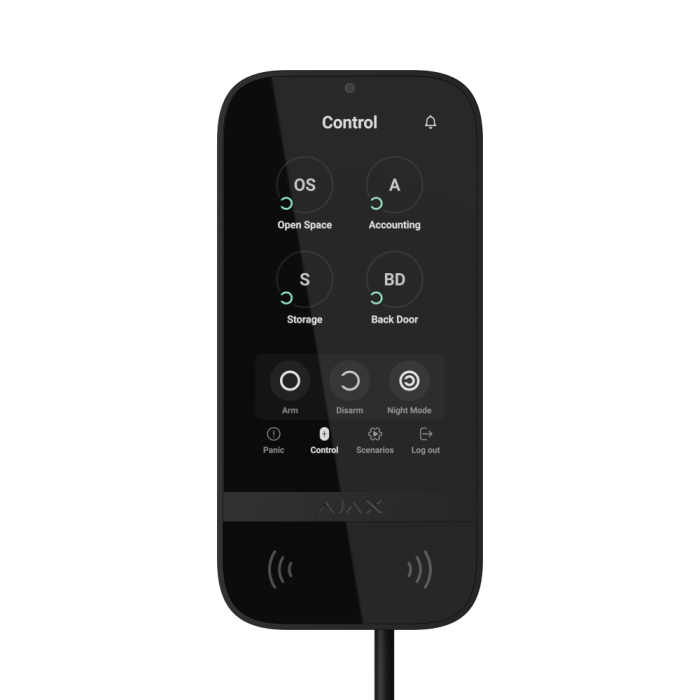
Ajax Superior KeyPad TouchScreen Fibra ASP - Black
Wired keypad with a touch screen, supporting authentication via Pass, Tag, smartphones, and codes
DELIVERY
We always aim to same day dispatch on all orders received before 2.30pm.
TRADE COUNTER
Firesense also offer the ability to collect your order from our trade counter.
Superior KeyPad TouchScreen Fibra
Wired keypad with a touch screen, supporting authentication via Pass, Tag, smartphones, and codes
Convenient Ajax system control
Superior KeyPad TouchScreen Fibra is designed for intuitive and convenient security and automation management. Its graphical interface, sound notifications, and LED indication ensure that user commands and system responses are delivered without fail. Users can view the latest alarms and events directly on the keypad to stay informed about recent system activity. If a malfunction is detected during the integrity check, the keypad clearly indicates the cause. This way, users are always aware of the system state and any actions to be taken.
Key features
- Touch IPS display - with a diagonal of 5"
- Control via smartphone - thanks to BLE support
- Operation with secured cards and key fobs
- Dark and light appearance options
- Log with the recent system events available directly from the keypad screen
- Passcode guessing protection
- Easy security group management
- Automation control
- Sound notifications - about delays, opening doors, and alarms
- Up to 2,000 m range of communication with an Ajax hub or a module that extends the Fibra line
- Fibra wired communication
- Up to 1.31 W - Fibra power consumption
- Three alarm types
- panic
- fire
- auxiliary alert
- Informative push notifications
- 32 languages
- Holding screw
- Remote control and configuration
- Two colours
- LED indication
- Tamper alarm
Three missions united in one device
Security management
Easily manage security for multiple groups. Users can view what's armed and make changes with just one touch, whether it's securing one group, multiple groups, activating night mode, or arming the entire facility. It's all simple and straightforward.
- Easy group management
- Security mode of each group is displayed on the screen
- Night mode and the entire security system control
Automation device control
The keypad has a separate control tab for automation devices, with the capacity for up to 6 buttons. Groups simplify the process of controlling multiple automation devices: switches, relays, sockets, and others. For instance, all LightSwitch switches can be assigned to one button and easily turn off all the lights in the entire house when users go to bed. Each automation device state (on or off) is visible on the screen2.
- Separate tab for automation control
- Up to 6 devices or groups of devices on one screen
- Visible automation device state (on or off)
Sound, LED, and on-screen notifications
Stay always informed with the built-in buzzer and LED indication. The keypad notifies about alarms, opening doors, arming/disarming, and entry/exit delays. If there is a malfunction in the system, the keypad will notify users about it before arming, providing detailed info on the issue. Additionally, the LED indicator displays the security mode status: red for armed and green for disarmed. The keypad also displays recent alarms and events, giving users a clear picture of what’s happening in the system.
- Sound and LED notifications about alarms and events
- Instant malfunction notifications
- On-screen log with the recent alarms and events
Three authentication methods
There are three easy ways to control the keypad, giving users the flexibility to choose what suits them best. All events display in the feed, including user activity and authentication details.
Smartphone
Control the keypad via smartphone with an Ajax app. Access rights are only granted to users approved by the admin
Pass card and Tag key fob
When someone uses the Pass card or the Tag key fob, it’s logged in the event feed of the Ajax app. The admin can revoke or restrict the access rights of the contactless access device at any time.
Code
Superior KeyPad TouchScreen Fibra supports the following code types:
- main keypad code
- personal codes
- codes for unregistered users
- RRU code
Contactless access devices
Pass card and the Tag key fob are equipped with original DESFire® chips and feature the same functionality but different enclosures. Users can choose the convenient form. One Tag or Pass can control up to 13 security systems. Access devices are sold separately in batches of 3, 10, or 100 pieces.
Access for unregistered users
With a simple assignment of a personal access code in the hub settings, office employees, cleaning company staff, or other individuals enter the area with convenience at its finest.
Remote access rights management
Change access rights and codes in real time in the Ajax apps. Compromised codes can be remotely altered within minutes. The installer doesn’t need to visit the object.
- Remote code management
- Remote user access rights management
- Remote blocking of cards, key fobs, and smartphones
Full protection in case of emergency
Superior KeyPad TouchScreen Fibra provides a tab with configurable panic buttons that can notify about three event types. If the user is forced to disarm the system, they can use a duress code. It simulates disarming, and simultaneously sends an alarm to the security company.
Exceptional touch screen experience
A high-resolution screen accommodates all necessary controls, ensuring a stunning and high-quality image. Featuring automatic brightness adjustment and a sleek glass design, the product combines aesthetics with convenience.
- 5-inch screen with a resolution of 480 × 854 px
- Bright during the day, not dazzling at night
- Screen protection against scrapes, scratches, etc.
Stable power supply under any conditions
Fibra line and backup batteries
The device is powered by the Fibra line and features backup batteries with an optimized charging algorithm. Thanks to this algorithm, the batteries require a minimum amount of energy to fully recharge without affecting other devices on the Fibra line.
External power supply
When connected to a 12 V⎓ external power supply unit, the keypad does not consume energy from the Fibra line. The keypad remains functional even when no external power supply is available, as it automatically switches to drawing power from the hub. Additionally, the Always active display feature is available when an external power supply unit is connected.
Unique wired technology
Fibra is proprietary Ajax technology for secure two-way communication between devices and a hub or module that extends the Fibra line. Fibra features encryption and device authentication to prevent sabotage, spoofing, and data theft. The Fibra line supports all types of devices, including sirens, keypads, and detectors with photo verification.
Energy efficiency as a priority
Fibra communication requires minimum power consumption: the keypad consumes only up to 1.31 W at its peak. Fibra also follows the TDMA principle. Each device has a short time frame to exchange data with a hub, and its communication module is inactive the rest of the time. This significantly reduces power consumption and helps avoid interference even when multiple devices communicate simultaneously.
Also, Superior KeyPad TouchScreen Fibra is hardwired with a built-in rechargeable battery. The battery has an optimized charging algorithm which uses the minimum energy required to fully recharge without affecting other connected devices.
Advanced system supervision
Superior KeyPad TouchScreen Fibra is a part of the Ajax ecosystem, transforming the keypad into a genuine IoT device. Each element of the ecosystem is constantly supervised. The keypad exchanges data with a hub via Fibra protocol. The hub has two-way communication with Ajax Cloud, which provides real-time information to Ajax apps. The Ajax system supervises device state every minute. If a keypad has an issue, you will receive a notification.
PRO is king
The myth about wired systems being difficult to install is busted. Ajax minimized an expensive, long, and dusty experience for PROs by developing an ultimate set of tools to make the process easy and flexible, from project design to client support and system maintenance. There is no need to disassemble the device for installation. Intuitive Ajax apps help quickly make the device a part of the system, and each device can be reconfigured remotely at any moment. No programming required — everything is available out of the box.
| Installation | Setup |
Configuration |
Monitoring |
| With the SmartBracket panel, an installer can effortlessly mount the device on a wall without disassembling the enclosure. The installation kit includes all the necessary fasteners. Instead, the boards with terminals are placed outside the enclosure under SmartBracket, preventing any hardware damage during installation. These boards are also removable, simplifying the entire process. To effectively manage cables, channels are integrated within the SmartBracket to secure the wires. Furthermore, a special screw ensures that the keypad is securely fastened onto the SmartBracket. | Installers can add a keypad in two ways: by automatically scanning lines or scanning a QR code. When scanning lines, they can identify the desired device either by clicking in the app or by activating a tamper. Once a device is added by an installer, it immediately has a default name and settings suitable for most cases. |
All testing and configuration can be done in mobile and desktop Ajax apps. An installer can work both on behalf of the company and as a sole installer. | Using proprietary protocols, any Ajax system can transmit alarms to the PRO Desktop monitoring app and third-party CMS. When an alarm is received, the monitoring station operator knows what happened and where to send the rapid response unit. All Ajax devices are addressable, allowing the transmission of events, device type, assigned name, and room to PRO Desktop or third-party monitoring software. |
| Approval | Grade 3 (EN 50131), PD 6662:2017 |
|---|---|
| Category Type | Keypad |
| Colour | Black |
| IP Rating | IP30 |
| System Type | Intruder |
| Clearance | No |
Write Your Own Review


Communication
| Fibra communication technology |
Proprietary wired communication technology. Fibra combines the reliability of wires with the freedom of radio connection.
|
| Line connection |
4-core cable |
| Connection |
to any point of the Fibra line Superior KeyPad TouchScreen Fibra can be installed after a hub, detector, siren, or other keypad. |
| Fibra line length |
up to 2,000 m When using the U/UTP cat.5 twisted pair cable. |
| Encrypted communication |
All stored and transmitted data are protected by block encryption featuring a dynamic key. |
Display
| Diagonal |
5″ |
| Matrix type |
IPS |
| Resolution |
480 × 854 px |
| Sensor |
capacitive |
| Brightness settings |
automatic manual If Auto adjust is enabled, the display brightness depends on the light conditions. This saves battery power. |
| Backlight lifetime |
30,000 hours Guaranteed backlight lifetime when the Always active display toggle is enabled. It can be adjusted in Ajax apps and activates only when external power is connected. |
Key features
| Panic buttons |
panic fire auxiliary help Sending an alarm or calling for help from the separate keypad tab. |
| Control |
codes Tag key fobs Pass cards smartphone (Bluetooth) |
| Contactless access |
DESFire® EV1, EV2 ISO14443-А (13.56 MHz) |
| Access codes |
up to 50 personal codes One code per each user. The number of personal access codes depends on the hub model. 1 keypad code Per each Superior KeyPad TouchScreen G3 Jeweller. |
| Duress codes |
up to 50 personal codes One code per each user. The number of personal duress codes depends on the hub model. 1 keypad code Per each Superior KeyPad TouchScreen G3 Jeweller. |
| Codes for unregistered users |
up to 50 codes for unregistered users For people who are not registered in the Ajax system. The number of such codes depends on the hub model. |
| Arming without entering a code |
The enabled feature allows the user to arm the system without entering a code or presenting the access device. |
| Group management |
Changing the security mode of the groups to which the user has access from the keypad’s display. |
| Scenarios management |
A separate keypad tab contains up to 6 buttons, and each one can control one automation device or a group of devices. |
| Indication of malfunctions and security modes |
display logo sound indication If enabled, the logo lights up red continuously or when the system or group is armed. Superior KeyPad TouchScreen G3 Jeweller indication is shown on the display only when it is active. Built-in buzzer notifies about alarms, door openings and entry/exit delays. |
| Fire alarm muting |
Turns off the fire detectors alarm, including the interconnected alarm. |
| User pre-authorization |
When the feature is enabled, viewing the current system status and control screen is unavailable. For access, the user must pre-authorize: enter a code or present a personal access device to the keypad. |
| Contactless authorization with a smartphone |
A smartphone with the installed Ajax app and Bluetooth Low Energy (BLE) support can be used instead of Tag or Pass to authorize a user. BLE is a radio protocol with low power consumption. The keypad supports Android and iOS smartphones with BLE 4.2 and higher. |
| Auto screen wakeup |
The keypad wakes up automatically when approaching it. The approaching distance can be adjusted in the app. |
| Remote firmware update |
When a new firmware is available, an admin or PRO with the rights to configure the system can run the update in Ajax apps. The keypad must be connected to an external power supply to update the firmware. |
| ACE Type |
type B |
Sabotage protection
| Unauthorized access auto-lock |
The keypad locks if an incorrect code is entered or unverified access devices are used more than 3 times in a row within 1 minute. The lock time is adjusted by PRO or user with admin rights in the Ajax app. |
| Tamper alarm | Notifications on attempts to detach the keypad from the surface or remove it from the mounting panel. |
| Holding screw |
To secure the keypad on SmartBracket. |
| Protection against spoofing |
device authentication |
| Communication loss detection |
after 36 s Detection time depends on the Jeweller or Jeweller/Fibra settings. |
Fibra line power supply
| Operating voltage range | 8−30 V⎓ |
| Nominal operating voltage | 24 V⎓ |
| Quiescent current consumption at nominal voltage | ~4 mA |
| Maximum current consumption at nominal voltage | ~52 mA |
| Maximum output peak-to-peak ripple voltage | 220 mV |
Enclosure
| Detector dimensions | 172 x 82 x 26 mm |
| Weight | 327 g |
| Operating temperature range | from -10 °C to +40 °C |
| Operating humidity | up to 75% |
Colour
| Available colours | Black, White |
Complete Set
| Contains | Superior KeyPad TouchScreen Fibra SmartBracket mounting panel Installation kit Quick start guide |
Warranty
| Warranty Period | 24 months |