We use cookies to make your experience better. To comply with the new e-Privacy directive, we need to ask for your consent to set the cookies. Learn more.

In stock
Product Code
125732.315.WH
SKU
AJ8600W
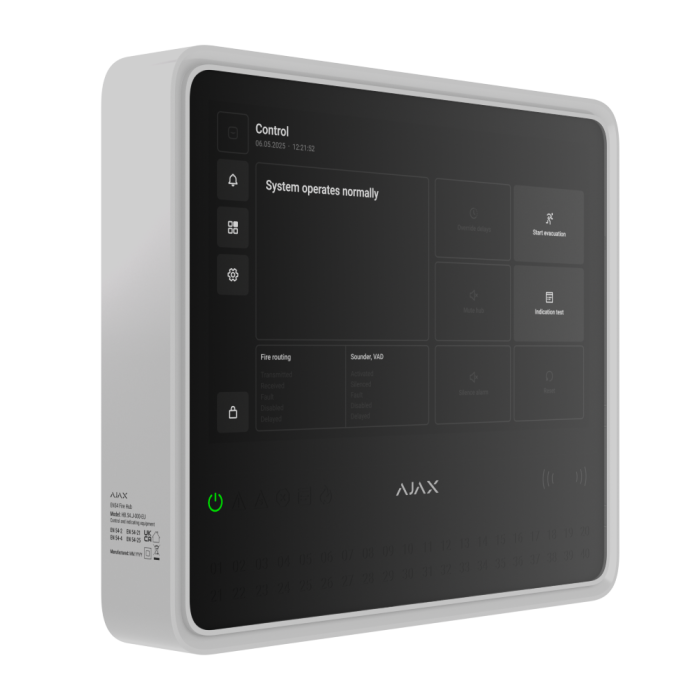
Ajax EN54 Fire Hub (8EU) ASP - White
Wireless control and indicating equipment (CIE) for a fire alarm system, supporting intrusion protection devices.
DELIVERY
We always aim to same day dispatch on all orders received before 2.30pm.
TRADE COUNTER
Firesense also offer the ability to collect your order from our trade counter.
EN54 Fire Hub Jeweller
Wireless control and indicating equipment (CIE) for a fire alarm system, supporting intrusion protection devices.
Compliant doesn't mean complicated
Introducing EN54 Fire Hub Jeweller, the Ajax's touchscreen CIE designed for all-around management of a fire safety system. It's easy to install, simple to use, and doesn't require much upkeep. Built-in communicators and a fully wireless device connection allow the system to be quickly deployed and connected to monitoring stations through Ajax apps. With its large touch screen and intuitive interface, the CIE provides detailed system status and alarm notifications, ensuring that staff are immediately aware of any situation.
The CIE also supports EN 50131 (Grade 2) intrusion protection, video surveillance, and automation devices, making it a unified solution for commercial and municipal sites. Each alarm can be supported by visual verification, helping guide the facility staff on responding to the emergency.
Built to stand out
| One device — many use cases: fire safety, intrusion protection, video surveillance, and automation within a single system. | User-centric system control and management via the CIE's color touch screen and Ajax apps, on-site or remotely. |
| Best-in-class wireless connectivity that easily outperforms wired alternatives. | Hassle-free installation with all communicators built in — no enclosure disassembling or programming. |
Big screen. Even bigger control.
All mandatory controls a fire safety officer needs are just a tap away. The CIE's ultra-responsive, large, color touch screen is designed for effortless navigation and control of the entire fire alarm system. On-screen event log shows exactly which device and zone need attention — nothing gets missed.
Built-in LED indicators and a buzzer provide instant alerts for alarms, faults, and system status updates. Moreover, the CIE interface speaks your language — just choose the preferred one in settings.
| Fire Alarm Control | Zones management | Sound and LED indication | Event log |
|
The Control tab of the CIE provides access to key fire alarm features according to EN 54. With a single tap, authorized users can:
|
All fire detectors, sounders, and VADs are grouped within the Fire zones tab. Based on access permissions, users can view each device's status, disable selected devices, or initiate testing. | The CIE touch screen has 40 LED indicators for each fire zone and six additional indicators to show the overall system status, including fire alarms, power supply status, and faults. A built-in 60 dB buzzer provides sound notifications for all alarms and events. | The CIE screen displays the Event log tab that chronologically captures every fire alarm event. The log can hold up to 5,000 entries and provides explicit data, including the device name, timestamp, and a detailed event description. |
Breaking old ways with powerful apps
EN54 Fire Hub Jeweller works in synergy with free mobile and desktop Ajax apps that seamlessly integrate into security professionals' workflow. Ajax apps allow for managing all devices across the system: fire alarm, intrusion protection, video surveillance, and automation. No programming, no outdated configuration tools — just an intuitive interface for faster installations, easier facility management, and efficient remote service.
All communicators built-in
EN54 Fire Hub Jeweller is fully equipped with all necessary EN 54-25 certified communicators, so there is no need to install additional modules. It provides seamless connectivity between the CIE and fire detectors, sounders, VADs, I/O modules, manual call points, and other system devices. When the manual call point is pressed, the alarm is spread to the sounders and VADs in just 3 seconds. At the same time, the fire alarm event is sent to the monitoring station via Wi-Fi, Ethernet, or 4G (LTE).
Communication between the CIE and system devices
Jeweller communication protocol
Transmits the real-time device statuses, alarms, events, and all measured readings to the Ajax apps.
Wings and TurboWings communication protocols
Transfer visual verifications and large data packets for individual settings such as interface languages and firmware updates.
- Wireless range of up to 1,800 m
- Encrypted two-way radio communication
- Notifications of jamming and connection loss
- Data packet reload in case of transmission errors
Communication with Ajax server and apps
The CIE can be connected to four internet providers simultaneously. It uses an Ethernet/Wi-Fi connection as the primary channel and has two SIM cards that support 2G/4G (LTE) as backups. If the primary channel is lost, the CIE automatically selects the SIM with the strongest signal. Switching between channels takes seconds.
- Ethernet
- Wi-Fi
- Cellular: 2 × SIM 2G/4G (LTE)
Event transmission to the monitoring station
SurGard (Contact ID) protocol
The protocol is commonly used by older versions of monitoring software. Ajax CIE sends events to a SurGard receiver over PSTN or IP. Each event is coded to a 4-digit message in a Contact ID format.
SIA DC-09 protocol (IP-based)
The more modern, secure IP-based protocol developed by the Security Industry Association (SIA). All CIE events are sent as encrypted messages over TCP/IP. Each message includes details like event type, time, and CIE ID in an XML or text format.
Quick installation and easy setup
Ajax Systems redefines how easy and fast a fire alarm can be installed in an industry known for its complexity. EN54 Fire Hub Jeweller comes fully assembled and ready to operate right out of the box. The CIE can be installed in minutes without opening the enclosure to mount it. Insert the internal battery2 into a compartment and provide either 24 or 72 hours of the CIE's backup runtime (depending on the battery model).
All system devices can be added and configured from a smartphone or PC through the Ajax apps, so getting started is as efficient as it gets. There's no need to program complex logic manually — configure the system using human-readable text through an intuitive, self-explanatory interface.
| Installation |
Adding to the system |
Setup |
Monitoring |
| To install the CIE, there is no need to disassemble the enclosure: the device is easily mounted on the SmartBracket panel. The installation kit includes all the necessary fasteners so an installer can effortlessly mount the device on the wall. In case cables are not routed inside the wall, a GlandBox wiring accessory for lateral wire entry via cable glands is available. |
To add the CIE to a system, connect it to a power source (mains and internal battery2) and the internet. The CIE is then added to a system by scanning the QR code or entering its ID manually. Once added, the CIE receives a default name and settings suitable for most cases. | Intuitive Ajax apps provide easy maintenance and commissioning from anywhere the internet is available, on a smartphone or PC. Remote access gives installers the same level of awareness and control as if they were physically on site. |
An Ajax system transmits alarms to the Ajax PRO Desktop monitoring app or any third-party monitoring software in less than a second. Notifications include all the necessary information: the device name, location, and time of the event. The monitoring company also receives photo or video verification, capturing the reason for the alarm |
Built for fire safety. Ready for much more.
EN54 Fire Hub Jeweller isn't just a fire alarm CIE — it's a flexible solution for building comprehensive security. It can operate as a standalone fire alarm or as part of an integrated system that combines fire safety, intrusion protection, automation, and even video surveillance.
Fire alarm system
- Fully compliant with EN 54 and BOSEC
- Reliable detection of smoke and rapid temperature rise
- Audible and visual indication that meet strict regulatory requirements
- Automated control of fire protection and evacuation equipment during fire alarms
- System management via the CIE large touch screen or Ajax apps
Fire alarm combined with intrusion protection
- Compliant with EN 54 and EN 50131 (Grade 2) standards
- Fire alarm, intrusion protection, video surveillance, and automation integrated into a single system
- Support for visual alarm verification, which allows faster threat identification and response
- Enhanced system capabilities through automation
- Complete control of all devices via Ajax mobile and desktop apps
Discover future-proof hardware
- LED indication for showing all mandatory indication as well as individual zone indication
- 60 dB Buzzer to inform about fire alarms and faults
- DESFire Reader for contactless access with Tag or Pass
- SmartBracket mounting panel to install the CIE with no need to disassemble the enclosure
- Slot for installing an internal battery featuring hot swap without the CIE shutdown
- NC and NO relay outputs for faults and fire alarm transmission
- Tamper button
- Ethernet connection module
- Wi-Fi antenna
- Two slots for SIM cards
- Jeweller antenna
- Wings antenna
Fast and secure authentication
There are two easy ways for user authentication: via personal codes and via contactless access devices such as Ajax Pass or Tag. Every use of an access device or code is logged and displayed in the app and on the CIE screen, providing full traceability. Facility owners can instantly grant, revoke, or adjust permissions for fire officers or other users remotely in Ajax apps.
Code:
EN54 Fire Hub Jeweller supports up to 200 personal access codes. Each user's code and access rights can be managed remotely in real time via Ajax apps — there is no need to visit the site. If a code is compromised, it can be updated in seconds.
Pass card and Tag key fob:
With Ajax Pass or Tag, a fire officer can authenticate with one move of a hand, presenting the access device to the CIE reader. Each use of a contactless access device is recorded in the event log. The admin can revoke, restrict, or temporarily suspend access devices at any time.
Safety without obstacles
EN54 Line is suitable for a wide range of facilities, from small restaurants and gas stations to schools and office buildings. With a wireless communication range of up to 1,800 meters between the CIE and system devices, it offers reliable performance even across large premises.
To extend coverage even further, the EN54 Fire ReX Jeweller range extender connects to the CIE wirelessly and via Ethernet. Up to 5 range extenders can operate within one Ajax system to expand the network twice as big. It's the perfect solution for multi-story buildings or facilities with thick walls, allowing devices to operate at greater distances without compromising reliability.
- Communication range of up to 1,800 m between the CIE and devices
- Up to 35 km² of coverage with 5 range extenders per CIE
- Support for any device combinations within the CIE limits
Visual verification of alarms
The CIE supports photo and video alarm verification via Ajax MotionCam detectors and security cameras. Integrated in one powerful system, this device combination does the trick. It helps quickly assess the situation, saving users from concerns and monitoring companies from unnecessary dispatches.
Automation for greater safety
EN54 Fire Hub Jeweller supports up to 64 automation scenarios, offering the flexibility to tailor safety to each site's specific needs. With the EN54 I/O Module (2X2) Jeweller, the system can control fire protection equipment, such as triggering PAVA & VACIE voice evacuation systems, opening electric locks, switching on LED emergency signage, or blocking elevator access. All automated actions will be executed even if the CIE is offline.
When intrusion devices are connected, automation can go further. The CIE can shut off water during a leak or turn on ventilation if the CO₂ level rises. Users can also automate lighting, roller shutters, and garage doors based on arming/disarming, schedules, button presses, or detector alarms.
Emergency exit management
In case of fire, the system automatically unlocks emergency exit doors to ensure safe evacuation.
Scheduled visual verification
Ajax MotionCam detectors can capture photos on a schedule, delivering visual updates from the facility without requiring round-the-clock video surveillance.
Automatic water shut-off
The system automatically shuts off water in 7 seconds whenever LeaksProtect Jeweller or a third-party sensor detects flooding.
Stable performance even in a blackout
Main power supply
The CIE features power terminals1 for direct connection to a 110–240 V~, 50/60 Hz mains supply.
Backup battery
The CIE has a compartment for installing a backup battery2: EN54 Internal Battery (24h) or EN54 Internal Battery (72h). Each battery provides up to 24 or 72 hours of autonomous operation4, respectively. Batteries can be hot-swapped at any time without powering down the CIE.
Immunity to lags, freezing, and viruses
EN54 Fire Hub Jeweller runs on OS Malevich, a real-time operating system developed by Ajax Systems. The system is immune to viruses, resistant to cyberattacks, and extremely reliable. Loading and executing actions takes less than a second from tapping on a smartphone. Each automation scenario is executed within the same rapid timeframe.
The CIE features auto-updates via the internet. Using the Wings communication protocol, the CIE can also transmit updates to connected devices. Each update enhances the overall system performance and adds new features, so Ajax devices evolve and remain relevant for years.
Advanced system supervision
All Ajax devices perform automatic self-diagnosis and report their states to the CIE. Essential parameters, including tamper, communication, power supply, and sensor statuses, are continuously monitored. The Ajax Cloud server controls communication between the CIE and Ajax apps, ensuring instant notifications for monitoring stations, security companies, and users. In case of any fault or communication failure, a fire officer is informed immediately to request necessary services.
Sabotage resistance
Device authentication against spoofing
The CIE automatically checks the device's unique parameters for authentication during each communication session. If any parameter fails the check, the CIE ignores commands from the connected device.
Communication failure detection in 36 s
Each system device regularly exchanges data with the CIE. With maximum ping interval settings available (3 data packages once in 12 seconds), it takes only 36 seconds to identify communication loss and notify the security company and users about the incident.
Informative push notifications
The system instantly notifies users about alarms with critical alerts via Ajax apps. Notifications include alarm type, device name, facility name, and device room. Each detector's alarm also has a code for the monitoring software to identify its type. The CIE transmits alarms to the Ajax PRO Desktop monitoring app or third-party CMS using proprietary protocols. Upon receiving an alarm, the operator knows exactly where to dispatch the help.
Tamper alarm
The CIE enclosure has a tamper button that alerts when the device is detached from the surface or removed from the mounting panel. Additionally, the CIE is secured with a lock at the bottom of the enclosure to enhance its resistance to dismantling attempts. The lock can be opened by a special key tool included in the complete set.
Data encryption
All data the system stores and transmits is protected by a block cipher with a dynamic key. Encryption makes it extremely difficult to reprogram the device, replace, or steal the data.
Jamming detection and frequency hopping
The CIE constantly analyzes the quality of wireless communication with system devices. If some data packages are lost, the CIE uses radio hopping and automatically changes frequency within a band, notifying the security company and users about the jamming.
| Approval | EN54-2 , EN54-4, EN54-25 |
|---|---|
| Category Type | Hubs |
| Colour | White |
| IP Rating | IP20 |
| System Type | Wireless |
| Clearance | No |
Write Your Own Review

Capacity
| Devices |
Up to 200 Supports Ajax devices from the EN54 product line, wireless intrusion devices, and resettable buttons for manual fire alarm activation in any combination, except for the following:
|
| Fire Zones |
Up to 40 Alerts about fire in separate zones. Every zone may include multiple rooms. |
| Ajax NVRs | Up to 36 |
| Ajax Cameras | Up to 224 via Ajax NVRs and up to 492 standalone |
| Third-party IP Cameras | Up to 10 when using RTSP via SDK Up to 224 when using ONVIF via Ajax NVRs |
| Users |
Up to 200
|
| Automation scenarios | Up to 64
|
| Rooms | Up to 80 |
| Event Log |
Up to 5,000 eventsFire alarm system events. Can be viewed on the CIE display. Events are saved on the non-volatile onboard flash memory. Up to 500 eventsFire alarm, intrusion, and other system events. Can be viewed in the events feed in Ajax apps. |
Communication
| Jeweller communication technology | Proprietary wireless communication technology to transmit commands, alarms, and events.Key features:
|
| Frequency Bands | 866.0–866.5 MHz 868.0–868.6 MHz 868.7–869.2 MHz 905.0–926.5 MHz 915.85–926.5 MHz 921.0–922.0 MHzDepends on the sales region. |
| Maximum effective radiated power (ERP) | Up to 20 mW. Automatic power control to reduce power consumption and radio interference. |
| Radio signal modulation | GFSK |
| Radio communication range |
up to 1,800 m Between the CIE and connected devices (in an open space). Maximum range depends on the connected device. |
| Encrypted communication | All stored and transmitted data are protected by block encryption featuring a dynamic key. |
| Frequency hopping | To prevent radio interference and jamming. |
| Wings communication technology |
Proprietary wireless communication technology to transmit photo verifications and update firmware. Key features:
|
Communication Channels
| Ethernet |
1 8P8C socket Up to 100 Mbps. |
| Cellular | 2 micro-SIM slots |
| Cellular frequencies |
2G GSM900/DCS1800 (B3/B8) 4G (LTE) FDD B1/B3/B5/B7/B8/B20 |
| Wi-Fi |
802.11 b/g/n module up to 72 Mbps. |
| Automatic switching between communication channels |
|
| Communication channels prioritisation |
1. Ethernet Communication channels work in parallel to increase the system’s reliability. Most of the data is transmitted via Ethernet. |
Notifications
| Supported notification types |
|
| Event Types |
The notification types are configured individually for each user. |
Monitoring
| Supported protocols |
|
| Event types |
|
Fire alarm system management
| Indication of fire alarms and faults |
LEDs on the front panel of the CIE and the built-in buzzer notify users of fire alarms in zones, faults, and system states. In case of fire, the CIE also activates visual alarm devices and fire alarm sounders. The CIE display also shows system states and detailed alarm information. |
| Fire alarm control |
Users with appropriate rights can manage the fire alarm system via these options. |
| Fire alarm system settings | Users with appropriate rights can configure all fire alarm system settings via the CIE. |
| Event log | Stores a detailed log of fire alarms and system events. Capacity: up to 5,000 events. |
Photo Verification
| Photo verification types |
|
| Photo delivery time |
Up to 9 s By default. |
| Photo resolution |
Up to 960 × 720 pixels Depends on the detector. |
| Number of photos in a series | from 1 to 5 pictures |
Additional features
| User authorisation | To manage the fire alarm system via the CIE touch screen, the user must log in by entering a code or presenting a personal access device. |
| Control |
|
| Contactless access (Coming soon) |
DESFire® EV1, EV2 ISO14443-А (13.56 MHz) |
| Access codes |
Up to 200 codes One code per each user. Defines user access level to security and fire alarm system management. |
| Duress codes |
Up to 200 personal codes One code per each user. |
| Built in buzzer |
Volume at least 60 dB at a distance of 1 m Sound alerts of fire alarms. Volume at least 50 dB at a distance of 1 m Sound alerts of faults. |
| LED Indication |
Red For fire alarms. Yellow For device faults, tests, and disablements. Green For power supply status. |
| Special tool (key) | The special tool is used to unlock the housing and replace the internal battery or dismantle the device from the SmartBracket mounting panel. The battery is not included in the CIE complete set. |
Display
| Diagonal | 10.1″ |
| Matrix Type | IPS |
| Resolution | 1024 x 600 px |
| Sensor | Capacitive |
| Backlight settings | Manually adjustable in the CIE on-screen settings |
| Interface language | Configurable via the CIE touch screen or in the CIE settings in Ajax apps. |
Outputs
| Output 1 | Relay output for alerting the monitoring company in case of a system fault. Contact state is normally closed (NC) by default. |
| Output 2 | Relay output for alerting the monitoring company in case of a fire alarm. Contact state is normally open (NO) by default. |
| Operating mode | Bistable |
| External power supply |
10–30 V⎓ The relay does not supply power to connected devices. |
| Energy Consumption |
Up to 60 W In standby mode. |
| Maximum resistive load | Up to 2 A at 30 V⎓ |
| Maximum inductive/capacitive load | Up to 2 A at 30 V⎓ |
Installation recommendations
| Where to install |
The device is designed for indoor use only. Use GlandBox if power and signal cables are not routed inside the wall. The device operating voltage is 110–240 V~. |
Sabotage Protection
| Tamper button | Notifications about the fault on attempts to detach the device from the surface or remove the mounting panel. |
| Protection against spoofing | Device authentication |
| Connection loss detection |
After 36 s Detection time depends on Jeweller settings. |
Power supply
| External |
110–240 V, 50/60 Hz Up to 0.48 A of mains power consumption. |
| Internal |
7.4 V⎓, 5 Ah/10 Ah On Rechargeable Li-ion battery not included in the complete set: EN54 Internal Battery (24h) or EN54 Internal Battery (72h). |
Autonomous operation
| On internal battery |
Up to 24 hours On EN54 Internal Battery (24h) not included in the complete set. Battery life is based on display activation only when tapped, using W-Fi, Ethernet, and cellular (LTE) communication channels. Up to 72 hours On EN54 Internal Battery (72h) not included in the complete set. Battery life is based on display activation only when tapped, using W-Fi, Ethernet, and cellular (LTE) communication channels. |
Enclosure
| Dimensions | 263 × 223 × 54 mm |
| Weight | 1,526 g |
| Operating temperature range | From -10 °C to +40 °C |
| Operating humidity | Up to 75% non-condensing |
| Protection class | IP20 |
| Flammability rating | UL 94 V-0 |
Colour
| Available colours | Black, White |
Complete Set
| Contains |
EN54 Fire Hub Jeweller SmartBracket mounting panel Installation kit Ethernet cable Special tool (key) Quick start guide |
Warranty
| Warranty Period | 24 months |