We use cookies to make your experience better. To comply with the new e-Privacy directive, we need to ask for your consent to set the cookies. Learn more.

In stock
Product Code
117760.285.BL
SKU
117760.285.BL
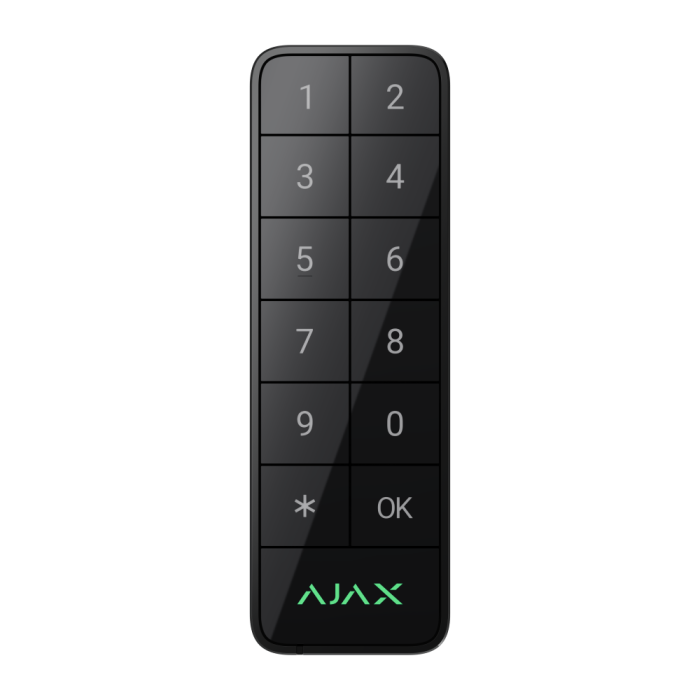
Ajax Superior Keypad Outdoor Fibra ASP - Black
Wired keypad supporting authentication via Pass, Tag, smartphones, and codes. For outdoor and indoor use.
DELIVERY
We always aim to same day dispatch on all orders received before 2.30pm.
TRADE COUNTER
Firesense also offer the ability to collect your order from our trade counter.
Superior KeyPad Outdoor Fibra
Wired keypad supporting authentication via Pass, Tag, smartphones, and codes. For outdoor and indoor use.
Control your space, rain or shine
Meet the all-weather key to security and automation. Control security modes, activate Night Mode, manage specific groups, and run scenarios with one keypad. Use classic passcodes or go contactless. The ultra-narrow enclosure fits anywhere and still has big, glove-friendly mechanical buttons with sleek feedback. The durable enclosure is built to withstand any operating conditions and maintain full functionality even after being hit or physically damaged. Uncompromisingly secure keypad that gives intruders a hard time to hack it open.
Key Features
- Support for contactless access devices - Pass cards and Tag key fobs featuring DESFire technology
- Contactless control via smartphone - using Bluetooth Low Energy (BLE)
- Two operating modes:
- Security
- Automation
- easy mode switching with a long press of the OK button
- Bypass mode - the keypad starts an entry delay to confirm a security mode change
- Duress codes - when a user is forced to disarm a system
- Code guessing protection
- Four types of access codes:
- Main keypad code
- Personal code
- Codes for unregistered users
- RRU codes
- Big mechanical buttons - sleek feedback even if a user wearing gloves or mittens
- Built-in panic button
- Tamper alarm
- IK08 protection against physical impacts
- IP66 protection against dust, water, and harsh temperatures
- 60 dB buzzer for sound notifications
- Up to 2,000m of wire communication
- Fibra wired connection
- Up to 0.6W - Ultra low power consumption
- informative push notifications
- Remote control and configuration
Three missions, one device
Security management
Easily manage the security of an entire site, separate groups, or activate Night Mode using just one device. It additionally features a Function button, which can be configured as a panic button or to mute fire alarms. KeyPad Outdoor can also operate in bypass mode: it starts an entry delay for users to confirm the security mode change via the main keypad, for example, with another Ajax keypad installed inside the facility.
- Security management of an entire site or separate groups
- Night Mode activation
- Bypass mode to start an entry delay to confirm a security mode change
Automation device control
The keypad can control one or multiple automation devices, such as switches, relays, sockets, outlets, and shut-off valves. For example, a user can open garage doors and turn on outdoor lights when arriving home (or close the garage and turn the lights off when leaving). Just one press of an OK button will set a scenario in motion. The buttons’ backlight indicates the automation device state2: red for off and green for on.
- Control over one or multiple automation devices with OK button
- Indication of an automation device state with backlight
Sound and LED indication
The glove-friendly keypad has backlit digits that do not fade. The built-in buzzer notifies you of alarms, doors being opened (Chime), arming/disarming, and entry/exit delays. The LED brightness and buzzer volume can be adjusted via Ajax apps.
- Sound notifications of alarms and events
- Mechanical buttons with backlit digits that are not fading off
- Adjustable sound volume and LED brightness
Fast and secure authentication
There are three easy ways to control the keypad, giving users the flexibility to choose what suits them best. Ajax apps display all events, including user activity and authentication details.
Pass card and Tag key fob
With Ajax Pass or Tag, the system can be armed or disarmed with one move of a hand: just present the access device to the keypad reader. Each use of a contactless access device is recorded in the Ajax app event feed. The admin can revoke, restrict, or temporarily suspend the access devices at any time. Administrators can also modify users’ rights by granting or limiting access to specific groups.
Smartphone
Get granted access rights by the system admin and pre-authorize your smartphone via Ajax apps for contactless control of the keypad using Bluetooth Low Energy (BLE).
Passcode
The keypad supports several types of access passcodes:
- Keypad code (one per keypad): a general code set up for the keypad.
- Personal codes: individual access codes configured personally by each system user in their Ajax app.
- Codes for unregistered users: codes created by an admin for cleaning personnel or real estate agents who don't have Ajax accounts. They use the keypad but have no access to the system
- info.
- RRU code: the access code configured by an admin for the rapid response units (RRU) to access the premises after receiving an alarm when the owner is not home. The code is activated only after an alarm and is valid for a specified period.
Contactless access devices
Pass and Tag are equipped with original DESFire® chips and share the same functionality but in a different shape of enclosures. One Tag or Pass can control up to 13 security systems. Access devices are sold separately in batches of 3, 10, or 100 pieces.
Remote access control
Change access rights and codes in real time via the Ajax apps. Lost access devices and compromised codes can be remotely altered within minutes. An installer doesn’t need to visit the facility.
- Remote code management
- Remote user access rights management
- Remote blocking of cards, key fobs, and smartphones
Access for unregistered users
With a simple assignment in the hub settings, a PRO can create a temporary access code for office employees, cleaning company staff, or other verified visitors.
Ready to assist in emergencies
The keypad has a panic button that triggers an alarm when pressed. The panic button can be configured to alert users about the alarm, activate sirens, or even run an automation scenario. If the user is forced to let in intruders, they can use a duress code to fake disarm: the keypad simulates regular disarming and immediately sends an alarm to the security company, notifying them about the emergency. Meanwhile, Ajax apps and sirens installed at the facility remain silent to prevent revealing a user.
Unique wired technology
Fibra is proprietary Ajax technology for secure two-way communication between devices and a hub or module that extends the Fibra line. Fibra features encryption and device authentication to prevent sabotage, spoofing, and data theft. The Fibra line supports all types of devices, including sirens, keypads, and detectors with photo verification.
Energy efficiency as a priority
Fibra communication requires minimum power consumption: the keypad consumes only up to 0.6 W at its peak. Fibra also follows the TDMA principle. Each device has a short time frame to exchange data with a hub, and its communication module is inactive the rest of the time. This significantly reduces power consumption and helps avoid interferences even when multiple devices communicate simultaneously.
Advanced system supervision
The keypad is a part of the Ajax ecosystem, which makes it a genuine IoT device. Each element of the ecosystem is constantly supervised. The keypad exchanges data with a hub via Fibra protocol. The hub has two-way communication with Ajax Cloud which provides real-time information to Ajax apps. The Ajax system supervises device state every minute. If a keypad has an issue, you will receive a notification.
PRO is king
The myth about wired systems being difficult to install is busted. Ajax minimized an expensive, long, and dusty experience for PROs by developing an ultimate set of tools to make the process easy and flexible, from project design to client support and system maintenance. There is no need to disassemble the device for installation. Intuitive Ajax apps help quickly make the device a part of the system, and each device can be reconfigured remotely at any moment. No programming required — everything is available out of the box.
| Installation | Setup | Configuration | Monitoring |
| With the SmartBracket mounting panel, an installer can effortlessly mount the device on the wall. The installation kit includes all the necessary fasteners. There is no need to disassemble the device: the board with terminals is placed outside the enclosure under SmartBracket to eliminate hardware damage during installation. The board is removable, which makes the whole process nice and easy. A built-in spirit level assists the professional in a perfectly accurate mounting position. For cable management, there are bracings inside SmartBracket to secure the wires with ties. | The device is paired with the hub automatically via Fibra line scanning. This tool is available in the desktop or mobile PRO apps. An installer only needs to name the device and assign it to the room and security group. The device can also be added by scanning the QR code or entering its ID manually. | Intuitive Ajax apps provide remote set-up and testing with all device information from anywhere the Internet is available, on a smartphone or PC. An installer can remotely change the settings and provide services promptly without visiting the object. | An Ajax system transmits alarms to the PRO Desktop monitoring app or any third-party CMS. The security company receives an alarm notification in less than a second. Notifications include all the necessary information: name of the device, time of the event, and the exact room where the device is located. The security company also receives photo or video verification, capturing the reason for the alarm. |
| Approval | Grade 3 (EN 50131) |
|---|---|
| Category Type | Keypad |
| Colour | Black |
| IP Rating | IP66 |
| System Type | Intruder |
| Clearance | No |
Write Your Own Review

Communication
| Fibra communication technology |
Proprietary wired communication technology. Fibra combines the reliability of wires with the freedom of radio connection.
|
| Line connection |
4-core cable |
| Fibra line length |
up to 2,000 meters When using the U/UTP cat.5 twisted pair. |
| Encrypted communication |
All stored and transmitted data are protected by block encryption featuring a dynamic key. |
Key features
| Keypad function |
Each keypad function can be configured as a primary or secondary one in the keypad settings in Ajax apps. Only one primary function and one secondary function can be set at once. Switch between functions by long-pressing the OK button on the keypad. |
| Control methods |
codes Tag key fobs Pass cards smartphone (Bluetooth) |
| Access codes |
up to 50 personal codes One code per user. The number of personal access codes depends on the hub model. 1 keypad code Per each Superior KeyPad Outdoor Fibra. |
| Duress code |
50 personal codes One per each user. 1 keypad code One per Superior KeyPad Outdoor Fibra. |
| Codes for unregistered users |
up to 50 personal codes For people who are not registered in an Ajax system. The number of such codes depends on the hub model. |
| Contactless access |
DESFire® EV1, EV2, EV3 ISO 14443-А (13.56 MHz) |
| Contactless authorization with a smartphone |
It is possible to use a smartphone with an installed Ajax app and Bluetooth Low Energy (BLE) support instead of Tag or Pass to authorize a user. BLE is a radio protocol with low power consumption. The keypad supports Android and iOS smartphones with BLE 4.2 and later. |
| Arming without entering a code |
The enabled feature allows the user to arm the facility without entering a code or presenting an access device. |
| Group security management |
Changing the security mode of the groups to which the user has access from the keypad. |
| Authorization confirmation with a passcode |
Configuring two-factor authentication. If enabled, users must first use an access device (Pass, Tag, or smartphone) and then enter a passcode to confirm their authorization to the system. |
| Function button |
Operates in one of the following modes. panic Sends an alarm to the central monitoring station and users. It also activates the sirens connected to the system. mute fire alarm none |
Sabotage protection
| Unauthorized access auto-lock |
The keypad is locked if an incorrect code is entered or unverified access devices are used more than 3 times in a row within 1 minute. The lock time is adjusted by a PRO or user with admin rights in an Ajax app. |
| Tamper alarm | Notifications on attempts to detach the keypad from the surface or remove it from the mounting panel. |
| Holding screw |
To secure the keypad on SmartBracket. |
| Protection against spoofing |
device authentication |
| Communication loss detection |
after 36 s Detection time depends on the Jeweller/Fibra settings. |
Power supply
| Fibra line |
7−30 V⎓, up to 25 mA at a nominal voltage of 24 V⎓ The hub powers the device. |
Enclosure
| Dimensions | 137 x 45 x 27mm |
| Weight | 160 g |
| Operating temperature range | from -25 °C to +60 °C |
| Operating humidity | up to 80% |
| Protection class | IP66 IK08 |
Colour
| Available colours | Black, White, Graphite |
Complete Set
| Contains | Superior KeyPad Outdoor Fibra SmartBracket mounting panel Installation template Installation kit Quick start guide |
Warranty
| Warranty Period | 24 months |